Features · Anyone running an account who wants a diagnosis, not a dashboard
Growth Scorecard: your account, graded against your own niche
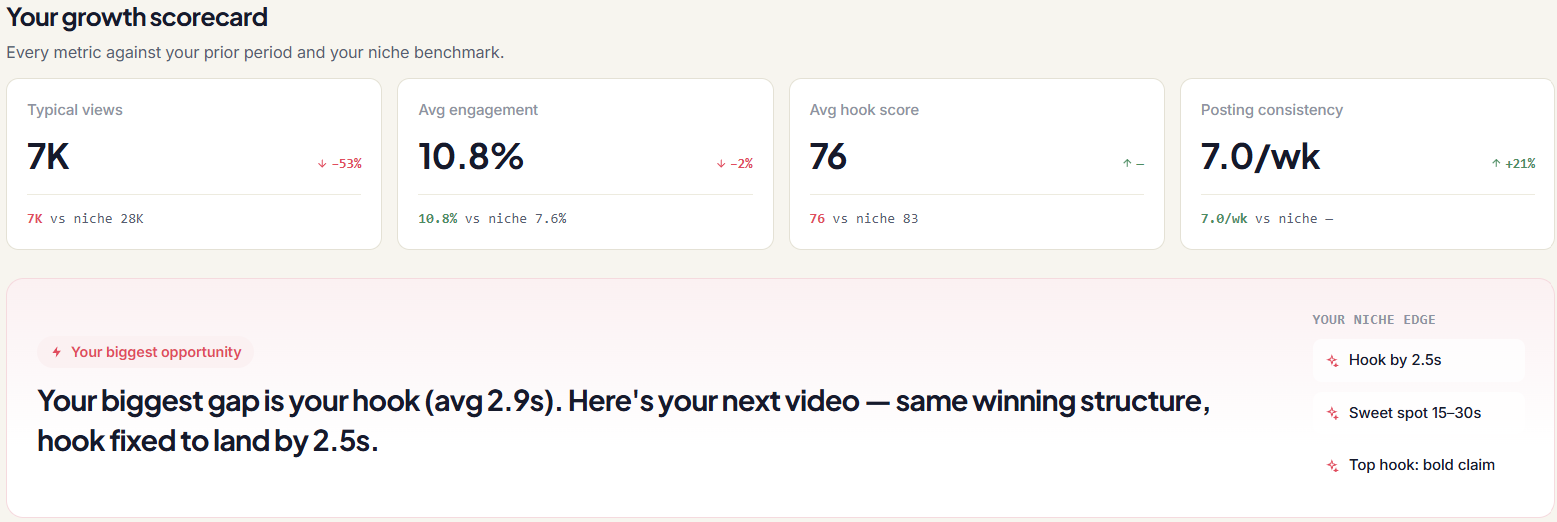
A 7% engagement rate is meaningless until you know what 7% means in your niche. The Growth Scorecard marks one of your tracked accounts as your own, then grades its videos against the benchmark set by your tracked competitors and the trends in your category. It names the single biggest thing holding the account back, puts a one-line fix on every video, and tracks whether the fixes are working — so the next decision is obvious rather than debated.
Used by 300+ creators, brands and agencies
- 1,000,000+ TikToks and Shorts tracked
- 100,000+ creators in our library
- 50,000+ hooks broken down
What this replaces
- Native analytics report numbers without a benchmark, so a good month and a bad month look the same.
- You can see which video underperformed but not which thing about it to change.
- Advice is generic — "post more", "hook them faster" — because nobody has read your actual videos.
- You change three things at once and learn nothing about which one mattered.
How it works
- Mark one of your tracked creators as your own account with the "This is my account" toggle.
- The scorecard grades each KPI against the prior period and against your niche benchmark.
- "Your biggest opportunity" names one diagnosed thing to improve, rather than a list.
- "Your videos, graded" scores every video, sortable by needs-most-work, score, views or recency, each with a one-line fix.
- "Your progress" tracks followers and metrics over time so you can see whether the changes landed.
What you get
- A growth scorecard: every KPI against both the prior period and your niche
- One diagnosed biggest opportunity, not a list of twenty suggestions
- Every one of your posts graded, each with a specific one-line fix; slideshows are graded on cover, swipe-through, slide count and save-worthiness against other slideshows
- Niche pattern cards showing what is currently winning in your category
- Follower and metric progress over time
- A link from any graded post into its full breakdown: frame by frame for a video, slide by slide for a slideshow
Which plan you need
Creator · 1 Viral Content Agent · 100 videos analyzed
The scorecard grades one account against the competitors you track, so it works from the entry tier — the benchmark gets sharper the more competitors you add.
- 100 videos analyzed, with hook, scenes and transcript
- 1 Viral Content Agent
- 20 AI scripts a month
- 10 viral-trend searches a month
- 1 seat
- Unlimited creators tracked
Questions
How do I tell it which account is mine?
Track the account like any other, then use the "This is my account" toggle on the creators page. The scorecard appears once one account is marked.
What is the benchmark made of?
The competitors you track plus the trends in your niche. Tracking more relevant competitors makes the benchmark more accurate.
Does it write the fix for me?
It diagnoses — the scorecard names the problem and the one-line fix per video. Turning that into a shootable script is the job of the AI Script Generator, and every graded video links across to it.
Do I need to connect my TikTok account?
No. Grading works from public data on any account you track. Connecting TikTok directly is optional.
How often does the scorecard update?
It is worked out from your latest data each time you open it. The account you mark as yours has its new posts checked every 6 hours and every stat updated daily, on every plan, so the grades move as your numbers do.
Does it grade TikTok slideshows?
Yes, against other slideshows. A slideshow is graded on its cover, swipe-through, slide count and save-worthiness, since it has no hook timing or scene pacing to score.
Try Growth Scorecard on your own account
Works inside Claude
Ask Claude how your account is doing against your niche
FYPNow runs an MCP server, so Claude can browse niches, tear down a video’s hook and scene timings, check creator breakouts and draft scripts, calling the real data instead of guessing. No API key: you approve the connection in a browser and pick which workspace it acts on. Included on every paid plan.